
university of birmingham
full ux/ui re-design job
I was hired to work for the University of Birmingham to help them deliver a project that included meeting accessibility guidelines for their student enrolment back end pages. I was hired to ensure that the new pages complied with the new WCAG 2.2 guidelines. Additionally, I addressed user pain points by improving the overall design.
Problem | Not accessible and not functional on smaller screens with a bad UI & UX
My Role | UX Designer
Solution | WCAG 2.2 compliant with improved User Interface & User Experience
User Centered Design
Accesible Design
Authentication UX
UX Research
Usability Testing
End to End UXD

My Role
Lead UX Designer
Timeline
Tools
Figma - Miro
Oct 2024 - Mar 2025
discovery
Project background: The University required someone who was able to implement a full UX/UI redesign for their student sign on pages for new students to be implemented for September 2027/28 terms. Before being hired I had to quickly display a small prototype using FIGMA and show how exactly I would be able to provide them with a high fidelity prototype to be able to then proceed with the handover to the technical team who would then implement it.
The problem: The re-design was essential for the University as WCAG 2.2 was implemented by the UK government which meant that every website for a public company had to be compliant with the new WCAG 2.2 rules and regulations. As the website was older it did not meet any of the WCAG 2.2 requirements. It was then my job to ensure that the new re-design met all the specific WCAG 2.2 requirements.
My Role: As lead UX Designer I was tasked to work alongside stakeholders and Business Analysts and Software Developers throughout the entire design process to ensure for a final complete design.
User research
Understanding user needs and evaluating pain points
The goal of conducting user research was to understand the experience that students had with the existing sign on process and to uncover accessibility and usability issues that the students may have.
Research Methods:
User Interviews
User interviews were conducted with student volunteers to gain an insight of the pain points
Surveys
A student survey was conducted on the use of the website before and was also conducted after the hi-fi redesign.
Usability testing
The students tested out a mock-up of the first page to gain an idea of usability before finishing the whole end to end prototype
After having gathered useful user feedback and results from the user research it was time to start working on the high-fidelity prototype and to ensure the new design solves the previous pain points which included mobile and tablet zoom issues, whilst ensuring the main WCAG 2.2 Accessibility guidelines were met.
Information architecture
Simplifying the student UX whilst sticking with WCAG 2.2 guidelines
This IA graph was designed to help understand the User Journey that the new students have to take for the Online Registration process.
Forgot password
Sign on page
Need help
Yes
No
Sign in
Contact support
Send link to email
1.Personal details
2.Disability details
3. Contact Info
4.Address details
5.Emergency details
6.Programme
7.Higher Education
8.Dubai campus
9.Career questions
10.Photo Upload
11.Finance questions
12.Electoral Reg
13.Authorisation
contacts
14.Declaration & Registration
Design & prototyping
Using Figma to create the Low- Fidelity & High-Fidelity prototypes
The goal of conducting user research was to understand the experience that students had with the existing sign on process and to uncover accessibility and usability issues that the students may have. Below are the three stages of prototyping from the sketch phase to the lo-fi phase all the way to the final high fidelity Figma design.
Stage 1: Hand-drawn lo-fi prototype
Stage 2: Lo-fi prototype
Stage 3: Hi-fi Figma design
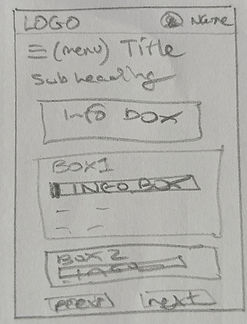


Stage 1: The first phase of the designing requires a quick sketch mockup of the potential online registration screen.
Stage 2: The second phase is a low fidelity mockup design on Figma which was created alongside stakeholders before continuing further.
Stage 3: The third and final stage was the final Figma prototype which is to be implemented for the 2026/27 terms.
Testing & iteration
Focus on validating the redesigned student sign on process Identifying issues and refining them based on user and stakeholder feedback
The goal of conducting user research was to understand the experience that students had with the existing sign on process and to uncover accessibility and usability issues that the students may have. This phase was of importance to help gain an understanding of the final pain points and was also run through specific browsers to ensure the WCAG 2.2 requirements were met. The prototype was then displayed before the board and stakeholders to ensure that everyone was pleased with the new re-design and was then to be handed over to the development team.
Final delivery handover
Final delivery presented to stakeholders / handover to coding team
The delivery and handover was conducted via PDF files in which I exported the documents so that the stakeholders who are not familiar with Figma are able to view the new re-design. I also created a word document with all the images of the seperate pages of the prototype with text below each screen including pixel sizes and widths, and the specific WCAG 2.2 compliant colour scheme, to ensure that the developers matched the new re-design perfectly.
previous Desktop screens


desktop re-design

Previous mobile screens


As you are able to see via the screenshots the student online enrolment pages did not have a mobile version.
Re-designed mobile screens

© 2026 JULIAN D

UX/UI DESIGNER